
Is Life360 worth it in 2026? If you want to know when your child arrives at school, check whether a family member got home safely, or share your location during a trip, Life360 is one of the best-known apps built around those needs.
But do you really need a paid membership? How accurate is its location tracking? Does it drain your battery? And what happens to your privacy when your family can see where you go?
These questions matter more than a long list of features.
Our quick verdict: Life360 is a useful family location-sharing app, especially for households that want ongoing location visibility and arrival alerts. Its free plan is a sensible starting point. Paid plans become more compelling if you need longer location history, more place alerts, or driving-related safety services.
However, Life360 isn’t a substitute for communication, trust, or emergency services. Location updates can be delayed, some safety features depend on device settings, and continuous location sharing may not be appropriate for every relationship.
This Life360 review covers its features, pricing, location accuracy, battery use, privacy considerations, and alternatives to help you decide whether it’s right for your family.
Editorial note: This is a research-based review using Life360’s official documentation, published pricing, and publicly available information. FamiWise has not conducted an independent hands-on performance test. Features, prices, and availability may change.
Life360 Review: Quick Verdict
Life360 is most useful when everyone in a family agrees that location sharing serves a practical purpose.
For example, parents may appreciate school arrival notifications, while adult family members may find it convenient to share their locations during travel.
Its strengths are convenience and the combination of several family safety tools in one app.
Its limitations are equally important: location data is not always perfectly accurate, premium memberships cost money, and sharing your movements continuously can create privacy concerns.
| Category | Our Assessment |
|---|---|
| Best for | Families wanting ongoing, opt-in location sharing |
| Main strengths | Circle maps, place alerts, location history, driving-related features |
| Main limitations | Location delays, battery use, privacy trade-offs |
| Free version | Useful for basic family location sharing |
| Paid version | More valuable for additional alerts, history, and safety services |
| iPhone and Android | Supported, subject to device and permission requirements |
| Our recommendation | Start with Free, then upgrade only if you need specific paid benefits |
What We Like About Life360
- The free plan offers useful location-sharing functionality.
- Place alerts can reduce repeated check-in messages.
- Family members can see one another on a shared map.
- Driving-related features may be helpful for households with teen drivers.
- Some paid plans combine location tools with roadside and emergency assistance.
- Life360 can work across iPhone and Android devices.
What Could Be Better?
- Accurate updates depend on connectivity and device settings.
- Location history and detailed movement information can feel intrusive.
- Premium plans may be expensive for families who need only basic tracking.
- Continuous background location activity can affect battery life.
- A location app cannot guarantee someone’s physical safety.
- Family expectations around privacy may become a source of conflict.
What Is Life360?
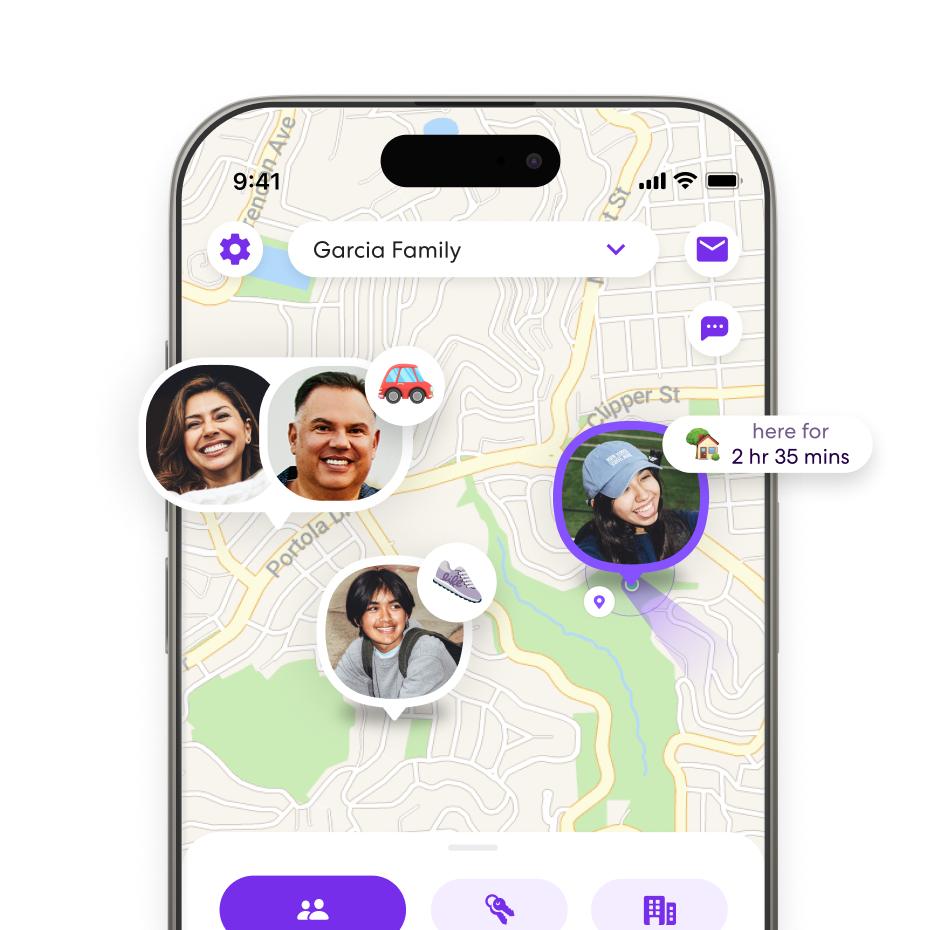
Life360 is a family location-sharing and safety app available for iPhone and Android.
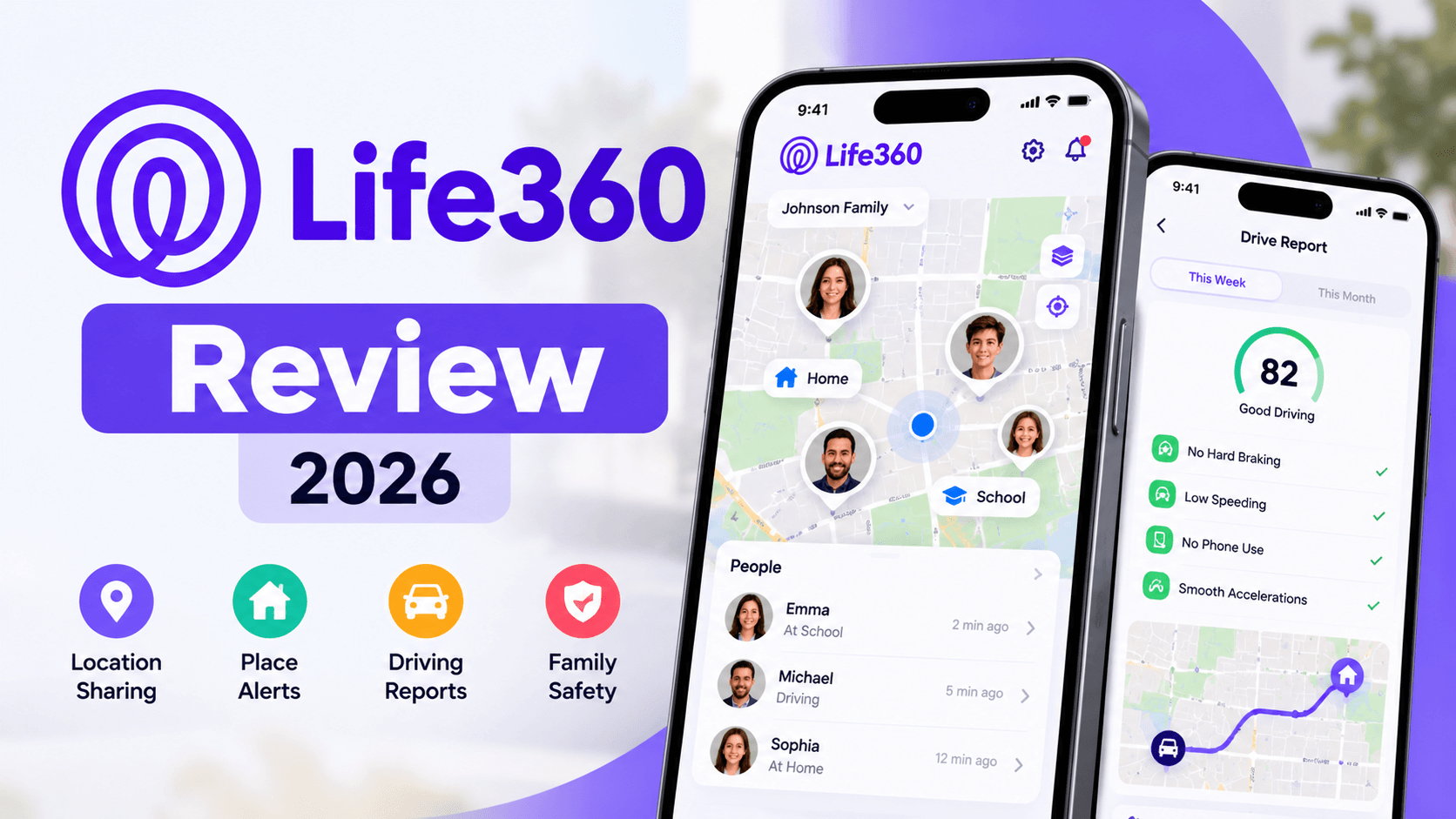
Its central feature is a shared map that helps members of a private group, called a Circle, view one another’s locations when location sharing is enabled.
A Circle might include parents and children, adult relatives, or other people who agree to share their locations.
Life360 also offers features such as place alerts, location history, driving information, crash detection, and additional safety services, depending on the plan and region.
Unlike phone monitoring software designed to access messages or detailed device activity, Life360 primarily focuses on location and safety-related information.
How Does Life360 Work?
To use Life360, members typically:
- Install the Life360 app on their phones.
- Create or join a Circle.
- Accept the relevant invitations.
- Enable location services and necessary permissions.
- Turn on location sharing within the Circle.
- View shared locations on the Circle map.
Life360 uses location information from the device, along with available network and sensor data, to display members’ positions.
The quality and frequency of updates depend on the phone’s connection, permissions, operating system, and other conditions.
Important: Life360 is an opt-in location-sharing service. It cannot guarantee visibility into someone else’s location if that person chooses not to share it.
Life360 Features Explained
1. Family Location Sharing
Location sharing is Life360’s main attraction.
Members of a Circle can view the shared locations of other participating members on a map.
This can be convenient when coordinating school pickups, checking travel progress, or meeting family members in unfamiliar places.
However, the map should be treated as a helpful estimate of someone’s location—not an infallible record of their movements.
A delayed update does not necessarily mean someone is still at the displayed location.
2. Place Alerts
Place Alerts notify Circle members when someone arrives at or leaves a designated location, subject to the applicable plan and settings.
Common examples include:
- School.
- Home.
- Work.
- A relative’s house.
- A regular activity location.
For parents, an arrival notification can be more convenient than asking a child to send a message every day.
Life360’s free plan includes a limited number of Place Alerts, while paid memberships offer additional options.
Place alerts may occasionally be delayed or missed if the device has poor connectivity or restrictive background settings.
3. Location History
Location History allows users to review recorded location information over a period of time.
The amount of history available depends on the membership plan.
In the United States, Life360’s published plan information lists:
- Free: 2 days.
- Silver: 7 days.
- Gold: 30 days.
- Platinum: 30 days.
Longer history may be useful when reviewing a trip or understanding a routine.
But it also means more detailed information about a person’s movements may be accessible.
Families should decide together whether that level of historical visibility is necessary.
4. Driving Reports
Life360 offers driving-related information designed to help families understand certain driving behaviors.
Depending on settings and membership, available information may include driving events and reports relating to speed, phone use, hard braking, or rapid acceleration.
This may interest parents of newly licensed teen drivers.
However, these reports are estimates based on device and sensor information.
Life360 acknowledges that driving speed and trip information can sometimes be inaccurate or incomplete.
A single reported event should not be treated as conclusive evidence of unsafe driving.
5. Crash Detection
Life360 offers Crash Detection in supported regions and configurations.
The feature uses available phone data to identify certain potentially serious vehicle collisions.
Some paid plans include emergency dispatch services associated with detected crashes.
However, crash detection has limitations.
It may not recognize every collision, and it depends on factors such as supported settings, device operation, connectivity, and service availability.
Life360 should never be your only emergency safety measure. If you witness or experience an emergency, contact local emergency services directly.
6. SOS and Emergency Assistance
Life360 includes safety alert features, while certain paid plans offer additional emergency services.
Depending on the membership and region, these may include emergency dispatch or roadside assistance.
Such services can provide an extra layer of support, especially for frequent drivers.
Before upgrading, review the precise service coverage, eligibility conditions, and exclusions.
7. Tile and Item Tracking
Life360 also supports integration with Tile-related tracking products.
This can help families see certain personal belongings alongside their shared location information.
For example, a family may want to keep track of keys or other compatible items.
Hardware purchases may be required for item-tracking functions.
This is separate from the app’s core family location-sharing capability.
Life360 Pricing: Free vs. Silver vs. Gold vs. Platinum
Life360 offers a free membership and several paid plans in the United States.
Here are the monthly prices displayed on its official U.S. pricing page as of October 30, 2026.
| Plan | U.S. Monthly Price | Key Benefits |
|---|---|---|
| Free | $0 | Basic location sharing, 2 days of history, 2 Place Alerts |
| Silver | $9.99 | 7 days of history, more alert locations, additional benefits |
| Gold | $16.99 | 30 days of history, unlimited Place Alerts, emergency and driving-related benefits |
| Platinum | $24.99 | Gold features plus expanded assistance and protection benefits |
Prices are based on the monthly billing option. Annual billing, promotions, regional differences, and taxes may change the final amount.
Is Life360 Free?
Yes. Life360 offers a free plan.
For many families, this is the most important part of the review.
You do not need to buy a premium membership just to use basic family location sharing.
The free plan includes features such as a Circle map, limited location history, and a limited number of Place Alerts.
That may be enough if your main goal is to check whether family members have arrived somewhere safely.
Is Life360 Silver Worth It?
Silver is aimed at users who want more flexibility than the free plan provides.
Its additional location history and expanded Place Alert options may be useful if you regularly monitor several important destinations.
However, if you only need one or two routine arrival notifications, the free plan may be sufficient.
Is Life360 Gold Worth It?
Gold is more compelling for households that want broader family safety benefits, especially those involving driving.
The plan includes longer location history, unlimited Place Alerts, and additional driving or emergency-related services.
It may be useful for families with teen drivers or people who travel frequently by car.
But if you only want to see where family members are on a map, Gold may be more than you need.
Is Life360 Platinum Worth It?
Platinum offers Life360’s most extensive membership package, with expanded assistance and protection benefits.
The extra cost may make sense for users who specifically value those services and meet the relevant eligibility requirements.
For a family seeking ordinary location sharing, Platinum is unlikely to be necessary.
Which Life360 Plan Should You Choose?
| Your Main Need | Suggested Starting Point |
|---|---|
| Basic family location sharing | Free |
| A few school or home arrival alerts | Free |
| More alert locations and longer history | Silver |
| Teen driving and expanded emergency services | Gold |
| Extensive assistance and protection benefits | Platinum |
Our recommendation: Start with Free. Upgrade only when you identify a specific paid feature that would make a meaningful difference.
How Accurate Is Life360?
Life360 can provide useful location information, but it is not perfectly accurate all the time.
Like other phone-based location services, it depends on multiple factors.
These include:
- GPS signal quality.
- Cellular or Wi-Fi connectivity.
- Location permissions.
- Background app activity.
- Battery-saving settings.
- Phone model and operating system.
- Whether the device is indoors or in an area with weak reception.
Why Does Life360 Show the Wrong Location?
An inaccurate location may result from a weak GPS signal, limited connectivity, or device settings that interfere with location updates.
For example, a phone inside a large building may have difficulty determining its precise position.
A displayed location may also be older than expected if the app has not updated successfully.
Why Is Life360 Not Updating Someone’s Location?
Common explanations include:
- The phone has no reliable internet connection.
- Location services are disabled.
- Location sharing is paused.
- The app has been logged out.
- Background activity is restricted.
- Battery-saving settings interfere with updates.
- The device has been turned off or has run out of power.
If a location appears outdated, check the last update time before drawing conclusions.
How to Improve Life360 Location Accuracy
Life360 recommends checking several settings:
- Enable the appropriate location permissions.
- Allow precise location access where supported.
- Keep Wi-Fi available.
- Make sure cellular data is working.
- Review battery optimization settings.
- Allow necessary background activity.
- Keep the Life360 app updated.
Some troubleshooting steps differ between iPhone and Android.
Also, avoid assuming that a displayed driving speed or route is an exact record.
Life360 states that speed and location information can contain errors and is not intended to serve as authoritative proof in disputes.
Does Life360 Drain Your Battery?
Yes, Life360 can affect battery life because it uses location services and background activity.
However, the impact varies.
Life360’s own support documentation says users may experience approximately 10% shorter battery life over a 24-hour period, although actual results can differ substantially depending on usage.
This is the company’s estimate, not an independent FamiWise test result.
Factors that may increase battery use include:
- Frequent location refreshes.
- Extended driving.
- High-precision GPS activity.
- Repeatedly opening the app.
- Device and operating system behavior.
How to Reduce Battery Use
You can help manage battery consumption by:
- Keeping Life360 updated.
- Avoiding unnecessary manual location refreshes.
- Checking your phone’s battery usage statistics.
- Reviewing whether all enabled features are necessary.
- Making sure the device is operating normally.
Be aware that aggressive battery-saving restrictions may reduce Life360’s ability to update locations reliably.
This creates a trade-off between battery life and background location performance.
Is Life360 Safe? Privacy and Data Sharing
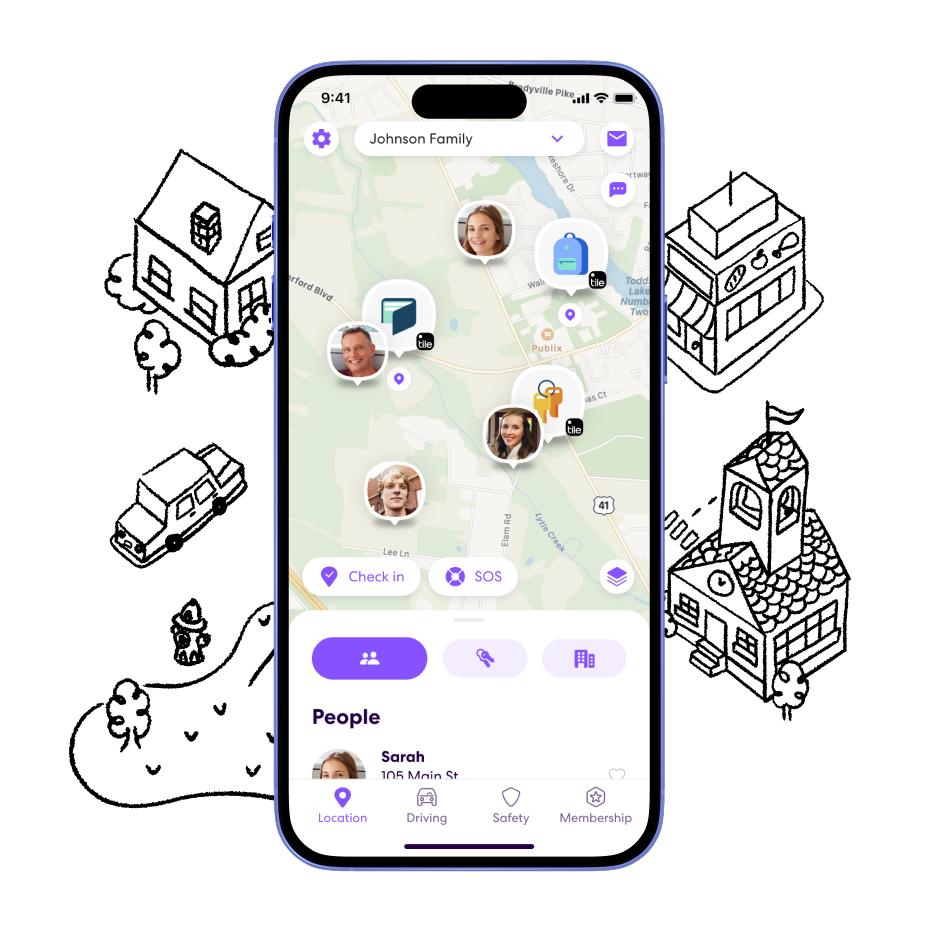
Life360 can be useful for family safety, but it collects and processes sensitive location information.
That deserves careful consideration.
A person’s location history may reveal where they live, work, study, shop, and spend time.
Even when sharing is voluntary, the information can be sensitive.
What Data Does Life360 Use?
Life360’s features may involve location data, device information, driving activity, account details, and other information described in its privacy documentation.
Its support materials also state that location-related data may be shared with partners for purposes such as crash detection, analytics, research, attribution, and tailored advertising, subject to applicable settings and policies.
Users should review Life360’s current privacy policy and available privacy controls before enabling extensive location sharing.
Can Life360 See Your Text Messages?
Life360’s primary purpose is location sharing and safety services.
It is not marketed as a tool for reading a family member’s private text messages or social media conversations.
If you’re comparing Life360 with phone monitoring software, the distinction matters.
Life360 is generally better understood as a family location app, not a comprehensive device surveillance service.
Can Other People See Your Location?
Members of a Circle may see your shared location when the relevant settings are enabled.
This makes Circle membership important.
Only invite people you trust and understand who can access the information.
Life360 also offers temporary location sharing through links, which has different access and duration considerations.
Should Couples Use Life360?
Some couples find location sharing convenient.
It can help coordinate plans, communicate during travel, or reduce unnecessary check-in messages.
But it should be a mutual choice.
Location sharing becomes unhealthy when it is used to pressure, punish, or constantly question a partner.
For a more detailed discussion, read our guide: Should Couples Share Their Location?.
A healthy location-sharing agreement should include consent, clear expectations, and the freedom to revisit those expectations.
What Happens When You Turn Off Location Sharing on Life360?
Life360 allows users to pause location sharing for a Circle.
According to its official support documentation, the general process is:
- Open Life360.
- Go to Settings.
- Select Location Sharing.
- Turn location sharing off for the relevant Circle.
When you do this, other members of that Circle will see Location Sharing Paused under your name.
If you belong to multiple Circles, the setting may need to be managed separately for each one.
Does Turning Off Location Sharing Delete Your History?
No.
Life360 states that pausing location sharing stops future location updates for that Circle, but does not automatically erase location history that was already collected.
This is an important privacy distinction.
Are There Exceptions?
Yes.
Life360’s support documentation explains that certain actions or safety features may still share location information, including:
- Using Check In.
- Sending an SOS alert.
- Certain crash detection events.
The exact behavior depends on settings, membership, and service availability.
If privacy is a priority, review the app’s controls and official documentation rather than assuming one toggle disables every possible form of location sharing.
Life360 Customer Reviews: Common Praise and Complaints
Life360 has a large user base, and public feedback reflects a variety of experiences.
The official website highlights positive app-store ratings and customer testimonials.
However, promotional testimonials should not be treated as independent evidence of performance.
For a balanced assessment, it’s useful to consider both common positive themes and recurring concerns.
What Users Appreciate
Positive feedback often centers on:
- Convenient family location sharing.
- Arrival and departure notifications.
- Peace of mind during travel.
- Coordination between parents and children.
- Driving-related safety features.
These benefits are especially relevant to households that use the app collaboratively.
Common Concerns
Potential complaints include:
- Location updates that lag.
- Inaccurate or outdated map positions.
- Increased battery consumption.
- Notifications that arrive later than expected.
- Subscription costs.
- Privacy concerns.
- Disagreements about how location information is used.
The significance of each issue depends on the user’s device, settings, and expectations.
How Should You Evaluate Reviews?
Look for detailed reviews mentioning the same operating system and features you intend to use.
A report about an older iPhone version may not accurately describe the current Android experience, and vice versa.
Also, distinguish between technical problems and disagreements about family monitoring.
A location app can work as designed while still being inappropriate for a particular relationship.
Life360 Pros and Cons
| Pros | Cons |
|---|---|
| Useful free location-sharing plan | Location updates may be delayed or inaccurate |
| Works across iPhone and Android | Continuous location access raises privacy concerns |
| Convenient Place Alerts | Battery usage may increase |
| Multiple family members in one Circle | Paid memberships can be costly |
| Location History options | Historical location data may feel intrusive |
| Driving-related safety tools | Driving reports are not perfectly accurate |
| Additional emergency services on paid plans | Some benefits have eligibility and regional restrictions |
| Tile-related item tracking | Some item-tracking features require additional hardware |
Life360’s biggest strength is its focus on making everyday family coordination easier.
Its biggest limitation is that location visibility does not automatically translate into safety or trust.
Life360 vs. Apple Find My vs. Google Maps
Life360 isn’t the only way to share your location.
Depending on your needs, Apple Find My or Google Maps may be enough.
| Feature | Life360 | Apple Find My | Google Maps |
|---|---|---|---|
| Family location sharing | Yes | Yes | Yes |
| iPhone support | Yes | Yes | Yes |
| Android support | Yes | No native Android Find My experience | Yes |
| Shared family map | Yes | Yes, within Apple’s ecosystem | Location sharing with selected people |
| Place-based alerts | Yes, plan-dependent | Supported location notifications | Some location-sharing notifications |
| Driving safety features | Yes, plan-dependent | Not a comparable core feature | Not a comparable core feature |
| Paid family safety memberships | Yes | Not required for basic Find My sharing | Not required for basic sharing |
When Life360 Is Better
Life360 may be more convenient when your family uses a mixture of iPhones and Android phones, wants ongoing Circle-based sharing, and values location history or driving-related services.
When Apple Find My Is Better
If everyone uses Apple devices and you mainly need location sharing, Apple’s built-in Find My functionality may be sufficient.
It can also reduce the need for another subscription.
When Google Maps Is Better
Google Maps can be a practical choice for users who want to share locations with selected people without adopting a dedicated family safety membership.
It may be especially useful for occasional or time-limited sharing.
Which Is Best for Your Family?
There is no universal winner.
If you only need to coordinate where people are, start with the free tools already available on your devices.
If you need additional family-specific alerts, history, and driving-related features, Life360 may offer more value.
You can explore more options in our guide to the best family location sharing apps.
Life360 vs. Parental Control Apps
Life360 is often discussed alongside parental control software, but it doesn’t serve exactly the same purpose.
A conventional parental control app may focus on:
- Screen-time limits.
- App approval.
- Web content filtering.
- Age-appropriate restrictions.
- Device schedules.
- Family supervision settings.
Life360 focuses more on location visibility and related safety features.
If your main concern is how much time your child spends on a phone, Life360 may not be the most relevant tool.
Our guide to the best parental control apps explains the differences between broader family supervision options.
Who Should Use Life360?
Life360 May Be a Good Fit For:
Parents of school-age children: Place Alerts can help confirm routine arrivals and departures.
Families with teen drivers: Driving-related features and eligible assistance services may offer additional reassurance.
Households using both iPhone and Android: A shared cross-platform location app can simplify coordination.
Families who travel frequently: Shared locations can help members stay connected during trips.
Adults caring for relatives: Location sharing may be useful when everyone understands and agrees to the arrangement.
Life360 May Not Be a Good Fit For:
People who only need occasional location sharing: Built-in free options may be enough.
Families uncomfortable with ongoing tracking: The privacy trade-off may outweigh the convenience.
Users expecting perfectly accurate real-time locations: No phone-based location app can guarantee that.
People seeking screen-time controls: A dedicated parental control app is more appropriate.
Relationships where location sharing is demanded or used as punishment: Technology cannot resolve an underlying trust problem.
Is Life360 Worth It in 2026?
For many families, Life360 is worth trying because its free plan already provides useful features.
It can simplify daily coordination and reduce repeated messages about arrivals and departures.
But a paid membership isn’t automatically necessary.
Our Recommendation by Situation
| Situation | Recommendation |
|---|---|
| You only need basic location sharing | Try Free |
| You want more location history and alerts | Consider Silver |
| You have a teen driver and want expanded safety services | Compare Gold carefully |
| You specifically need premium assistance and protection benefits | Evaluate Platinum |
| You only share your location occasionally | Consider Apple Find My or Google Maps |
| Your family is uncomfortable with continuous tracking | Agree on boundaries before installing |
The Bottom Line
Life360 is strongest as a practical coordination and safety tool used with everyone’s understanding.
Its free membership makes it easy to evaluate whether ongoing location sharing is useful.
Paid plans are more compelling when your family will actually use their additional features.
However, the most important question isn’t whether Life360 can show where someone is.
It’s whether that information improves your family’s safety and communication without undermining privacy or trust.
Frequently Asked Questions
1. Is Life360 free?
Yes. Life360 offers a free plan with basic location sharing, limited location history, and a limited number of Place Alerts.
2. How much does Life360 cost?
As of October 30, 2026, the U.S. monthly prices displayed by Life360 were $0 for Free, $9.99 for Silver, $16.99 for Gold, and $24.99 for Platinum. Pricing can change.
3. Is Life360 accurate?
Life360 can provide useful location estimates, but accuracy depends on GPS, connectivity, permissions, device settings, and other factors. Updates can sometimes be delayed or inaccurate.
4. Does Life360 drain your battery?
It can. Life360’s support documentation estimates roughly 10% shorter battery life over 24 hours, although actual impact varies significantly by usage and device.
5. Can Life360 track someone when their phone is off?
No. A powered-off phone cannot provide new live location updates. The app may display an older location or indicate a connection problem.
6. Does Life360 work on iPhone and Android?
Yes. Life360 supports both platforms, although the settings and background location requirements differ.
7. Can you turn off Life360 location sharing?
Yes. Users can pause sharing for a Circle through the app’s location-sharing settings. Other Circle members will see a paused-sharing status.
8. Does Life360 notify someone when location sharing is turned off?
Life360 displays a “Location Sharing Paused” status to other members of the relevant Circle. This makes the change visible, even if a separate push notification is not sent.
9. Can Life360 see your text messages?
Life360 is primarily a location-sharing and family safety app. It does not offer general access to a person’s private text messages as a core feature.
10. Is Life360 safe for families?
Life360 can be useful when location sharing is voluntary, appropriately configured, and understood by participating members. Users should review its privacy policy and data-sharing settings.
11. Is Life360 Gold worth it?
Gold may be worthwhile for families that need longer location history, unlimited Place Alerts, and eligible driving or emergency assistance features. For basic sharing, Free may be sufficient.
12. Is Life360 better than Find My?
It depends. Life360 offers additional family safety and driving-related features, while Apple Find My is a practical built-in option for households using Apple devices.
Final Thoughts
Life360 is a capable family location-sharing app with a useful free tier and a range of optional paid safety services.
Its greatest value comes from making everyday coordination easier—not from watching every movement a family member makes.
For most people, the best approach is to start with Life360 Free, learn how the location and privacy settings work, and upgrade only if a paid feature solves a real problem.
And before inviting anyone into a Circle, have a conversation about what location sharing means, when it’s useful, and when someone may want privacy.
A good family safety app should support trust, not replace it.
Sources and Further Reading
- Life360 — Official Membership Plans and Pricing
- Life360 Support — Improve Location Accuracy
- Life360 Support — Life360 and Battery Usage
- Life360 Support — Share My Location
- Life360 Support — Drive Detection & Analysis
- Life360 Support — Driving Speed & Accuracy
- Life360 Support — Permission Settings
Research updated: October 30, 2026. This review is based on published information, not independent hands-on testing. Features and prices may vary by country, device, and membership.